March 18, 2026
Vibe coding an educational demo in 30 minutes — and what it taught me about CS education
I recently attended a “vibe coding” workshop as part of our lab retreat. The premise was simple: pick a small project, fire up an AI coding agent, and see what you can build in about 30 minutes. No careful planning, no spec — just vibes.
What I ended up with surprised me. Not because the result is groundbreaking software, but because of what the process revealed about the relationship between domain knowledge, AI tools, and the value of a CS education.
Here’s the demo, the full story, and the takeaways.
The demo
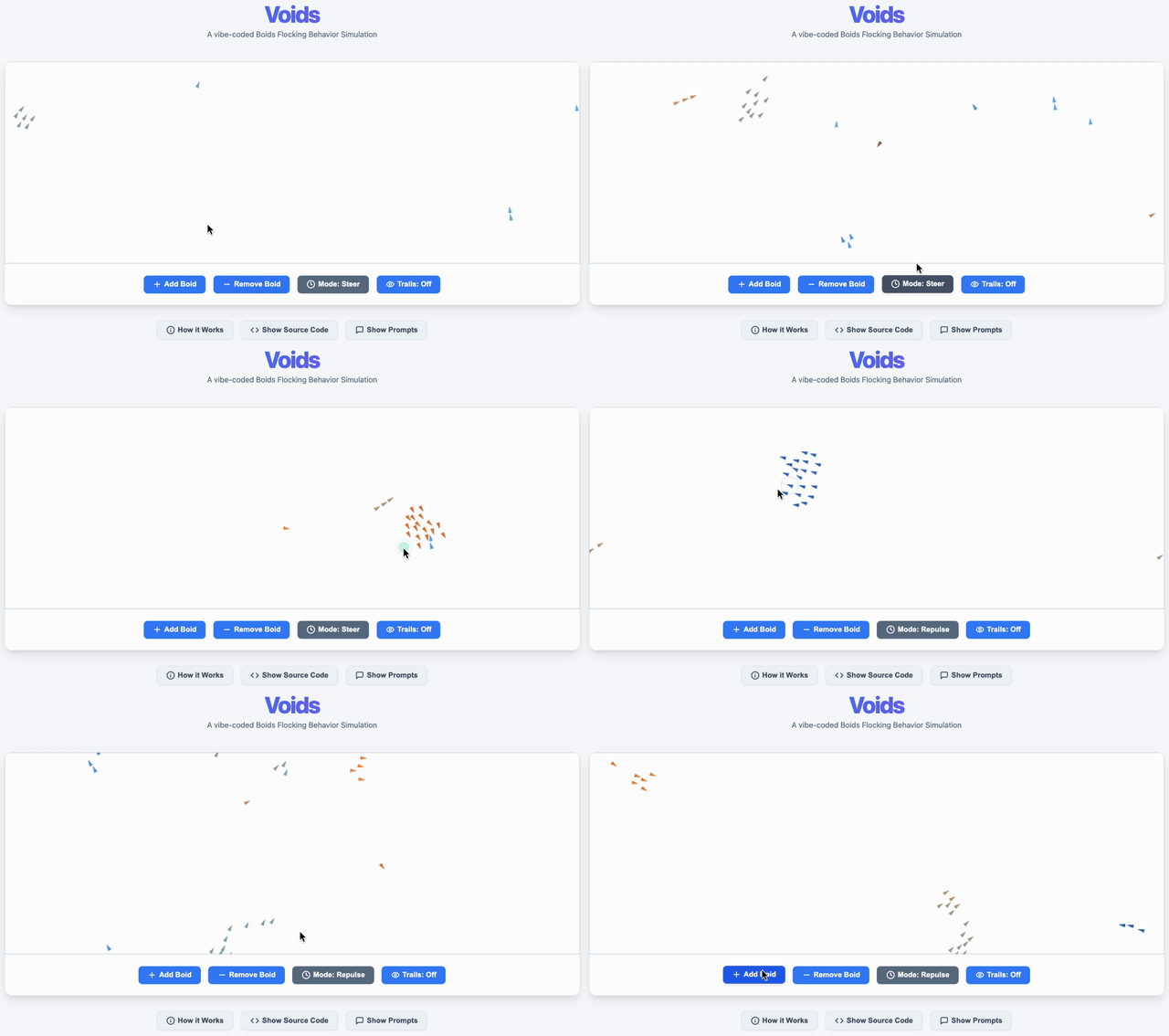
The demo illustrates the lifelike flocking behavior of little bird-like agents called “Boids”.
You can play with the live demo here.
The idea
I’m slated to attend an upcoming education fair where I represent Computer Science engineering education. The goal: get young adults excited about choosing a CS degree. A colleague recently mentioned that we don’t always offer very appealing demos at these fairs — just old, stuffy computer science textbooks. Fair point.
So I thought: let me vibe-code something that shows what computer science can do.
I wanted to visualize an algorithm in action through animation. I’ve long been inspired by Daniel Shiffman’s The Nature of Code, a wonderful resource that teaches computational thinking through visual simulations. I was already aware of his inspiring demo of “boids” — an “artificial life” program, originally invented by Craig Reynolds in 1986, that simulates the flocking behavior of birds (or fish) through three remarkably simple rules: separation, alignment, and cohesion. It’s a poster child of emergent behavior: complex, lifelike motion arising from simple deterministic rules. It’s often used in introductory AI courses, and it looks great on screen.
I also knew about Processing, a software framework that makes it trivially easy to program animations. Code is written in a dialect of Java with plenty of built-in graphics and math functions, and it can run directly in the browser via a library called Processing.js. This gave me a solid, well-scoped idea and an easy tech stack: Java, Processing.js, and some basic HTML with JavaScript to wrap it all in a webpage. Easy for me — I’m familiar with all of these — and easy for my AI copilots, who I was confident had seen plenty of relevant training data.
The workflow
The workshop was an experiment with AI coding agents, so I used two: GitHub Copilot (via VS Code) for the initial implementation, and Google Gemini CLI to refine and add features later. The workflow was simple and iterative:
-
Start with a hello-world. I pointed Copilot at an empty directory and asked it to scaffold a minimal Processing.js project — just a canvas that renders some text. Set the right expectations early: “this is just a hobby project, keep it simple.”
-
Swap in the algorithm. I replaced the hello-world with a basic boids simulation: 10 small triangle-shaped boids flocking on a full-width canvas with edge wrapping. Add and remove buttons for good measure.
-
Iterate on look and feel. Direction-based coloring (a smooth orange-to-blue palette), mouse interaction (click to attract or repulse boids), visual polish (a logo, nicer buttons, pulsing click feedback, spawn/removal animations, trails).
-
Make it educational. This is where it got interesting. I didn’t just want a pretty animation — I wanted the code itself to be front and center. Inspired by literate programming, I asked my copilots to embed the source code directly in the webpage, document it for beginners, refactor it for readability (named constants, clean structure), and render the comments in a sidebar next to the code so you can read it like a story. I also added a collapsible “How it Works” section explaining the three flocking rules, and — in a nicely meta touch — embedded the full AI conversation history as a “Show Prompts” panel so visitors can see exactly how the demo was built.
I did not prompt my coding agents to look at any specific earlier demos or reference implementations. I only mentioned I wanted to implement “boids” using Processing.js, and they took it from there.
The full conversation (all 19 steps, verbatim) can be read by clicking the “Show Prompts” button in the demo page.
The lessons
Impressed, but not magic
I was genuinely impressed by the speed and accuracy of my AI copilots. They took relatively vague, short prompts and consistently inferred my intent correctly. In about 30 minutes, I went from an empty folder to a polished, interactive, self-documenting educational demo. That’s remarkable. (I will admit I spent another good 30 minutes the next day to polish it further, as new ideas kept popping into my head).
But here’s the thing: I was able to move this fast because I already knew what I wanted to build. I knew how the boids algorithm works. I knew what Processing is and how to embed it in a webpage. I knew what literate programming looks like. I knew what interactions a canvas library makes easy and which are awkward. I didn’t need to think about any of these things during the session — that background knowledge was already loaded, letting me focus entirely on steering the AI.
This matters. The AI was fast, but I was the one making every design decision: what to build, in what order, at what level of complexity. The copilot was the engine; I was the driver.
A revealing mistake
Here’s a funny lesson about tech choices and the importance of planning ahead. It turns out I prompted my coding agents to use an obsolete framework. The modern way to write this kind of sketch is to use JavaScript directly with p5.js, the successor to Processing.js (which hasn’t been actively maintained in years). But because I said “Processing.js” in my opening prompt, the agents immediately latched onto it, generated Java code, and never questioned the choice.
And because I was truly vibe coding — not studying the generated code in detail — I didn’t even realize the code was Java until relatively late in the process! Everything worked fine, so I never had a reason to look closely.
This is a small but telling example: the AI will confidently build whatever you ask for, even if what you’re asking for is suboptimal. It won’t push back. It won’t suggest alternatives. The judgment call about what to build is entirely yours.
Ideal conditions for vibe coding
Let’s be honest about the conditions that made this experiment work so well. The stakes were extremely low. Nobody depends on this code for anything serious. It’s a greenfield hobby project with no users, no security requirements, no performance constraints, no tests to maintain. If a bug slips in, the worst that happens is a triangle flies in the wrong direction.
This is the ideal scenario for vibe coding, and it’s important to recognize that. The danger is that experiences like this make it appear as if learning to code is no longer important or rewarding. That would be a very wrong conclusion to draw.
Vibe coding is not software engineering
There’s a useful distinction to make between what I did here — vibe coding — and what professional developers increasingly do with AI tools, which Andrej Karpathy and Addy Osmani call agentic engineering. In his excellent blog post, Osmani describes the key differences and makes a point that I think is critical:
“The irony is that AI-assisted development actually rewards good engineering practices more than traditional coding does.”
And:
“Agentic engineering disproportionately benefits senior engineers. If you have deep fundamentals — you understand system design, security patterns, performance tradeoffs — you can leverage AI as a massive force multiplier. You know what good code looks like, so you can efficiently review and correct AI output.
But if you’re junior and you lean on AI before building those fundamentals, you risk a dangerous skill atrophy. You can produce code without understanding it. You can ship features without learning why certain patterns exist. […] This isn’t an argument against AI-assisted development. It’s an argument for being honest about what it demands. Agentic engineering isn’t easier than traditional engineering — it’s a different kind of hard. You’re trading typing time for review time, implementation effort for orchestration skill, writing code for reading and evaluating code. The fundamentals matter more, not less.”
I couldn’t agree more. My little boids demo was a fun exercise in vibe coding. But if this were production software — if it needed to be secure, maintainable, performant, testable — the bar for what I’d need to understand and verify would be dramatically higher. And the AI would be just as fast, but far less trustworthy without a knowledgeable human at the wheel.
Why a CS degree matters more than ever
This brings me to the message I actually want to bring to students at the education fair.
AI is a power tool, not a replacement. A nail gun didn’t replace architects; it eliminated drudgery and raised the baseline of what one person could build. LLMs are doing the same for code. The question is no longer “can you write a for-loop?” — it’s “do you know what to build, why, and whether the output is correct?” That judgment requires real CS foundations.
Every prior “automation” of programming expanded the field, not collapsed it. Compilers were supposed to make assembly programmers obsolete. High-level languages, IDEs, garbage collectors, and web frameworks were each declared the end of “real” programming. What actually happened every single time was that the new abstraction layer created more demand for software and more complex problems to solve. GenAI is another such layer. It raises the floor, not the ceiling.
AI produces plausible code, not necessarily correct code. A CS-educated engineer catches the subtle race condition, the off-by-one in a security-critical loop, the architectural decision that will collapse under scale. Someone who only prompts an LLM has no ground truth to verify against. Knowing why something works — algorithms, systems, formal reasoning — is precisely what makes AI output useful rather than dangerous.
The leverage of a skilled engineer has never been greater. A strong CS graduate equipped with AI tools today can do the work that a team of five did a decade ago. That’s not a threat to employment — it’s a compounding return on investment in understanding. The graduate who skipped the education and only learned to prompt will be outcompeted by the one who can do both.
The key reason I think the return on investment of a CS degree has never been stronger is precisely because of AI copilots acting as a force multiplier. By the time you graduate, you can easily be 10× more productive than a pre-GenAI-era CS graduate. I wouldn’t even bet against 100×. But that multiplier only works if you have something to multiply.
Acknowledgements
This blog post was written with help from Claude. The demo it describes was built in roughly one hour of iterative prompting. Steps 1-5 were done with GitHub Copilot, and iterative refinement thereafter with Google Gemini CLI.
I could never have dreamt this up so quickly without the inspiration of Daniel Shiffman’s The Nature of Code — a fantastic resource that you should absolutely check out.
The image in the “How it Works” section of the demo that explains the three flocking rules was adapted from Shawn Liam’s blog, itself an adaptation of Reynolds’s original diagrams.
Finally, a thank you to my DistriNet colleagues Tom Van Goethem and Pieter Philippaerts for organizing that vibe-coding workshop. Without it, this experiment wouldn’t have come into being.